
One Command, One Working Kubernetes Cluster! Building My Daily-Driver Lab on OrbStack.
Part 2 of 7 — The Mac Kubernetes Lab: A Production-Mirror Setup from Scratch.

Previously in Part 1: I walked through why I replaced Multipass with OrbStack, the dual-cluster architecture I settled on, and a preview of the M1 vs M4 CNI problem that’s coming in Part 4.
The cluster I am going to set up in this article is the one I spend most of my working day inside. It’s a single-node Kubernetes cluster, always on, idles at around 512 MB of memory, has real LoadBalancer IPs and wildcard DNS out of the box. No MetalLB, /etc/hosts editing,kubectl port-forward muscle memory. By the time this article is done, it will also have Istio, Vault, and Crossplane running. Total elapsed time, the first time you do it: about ten minutes.
If you’ve ever built a local Kubernetes cluster and then spent the next twenty minutes wiring up MetalLB and editing /etc/hosts so you can actually reach a service from a browser, this is going to feel almost suspicious.
# 💻 Mac
orb start k8s

# Confirm cluster is udr
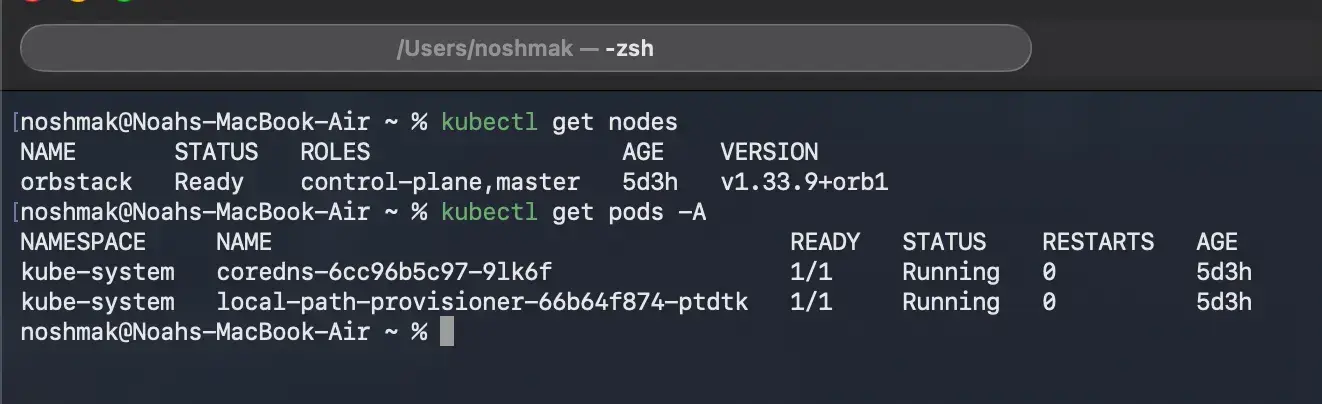
kubectl get nodes
# NAME       STATUS   ROLES                  AGE   VERSION
# orbstack   Ready    control-plane,master   30s   v1.33.x

kubectl config current-context
# orbstack
That’s all! No kubeadm, no CNI configuration, no certificate management. The cluster is up and reachable in under thirty seconds the first time, and instantly on every subsequent start.
What makes OrbStack’s networking special?
This is where OrbStack genuinely earns its keep. On a typical local cluster; kind, minikube, kubeadm, LoadBalancer services stay in pending state until you install MetalLB on OrbStack:
- LoadBalancer services get a real, reachable IP automatically.
- *.k8s.orb.local wildcard DNS resolves from your Mac browser, with no /etc/hosts entry.
- cluster.local DNS also resolves from your Mac.
- Every service type is reachable without kubectl port-forward.
⚠️ The wildcard DNS only resolves on your Mac. Other devices on your network won’t see *.k8s.orb.local. If you need a service reachable from another machine, that's what Cluster 2 (Parts 3–6) is for.
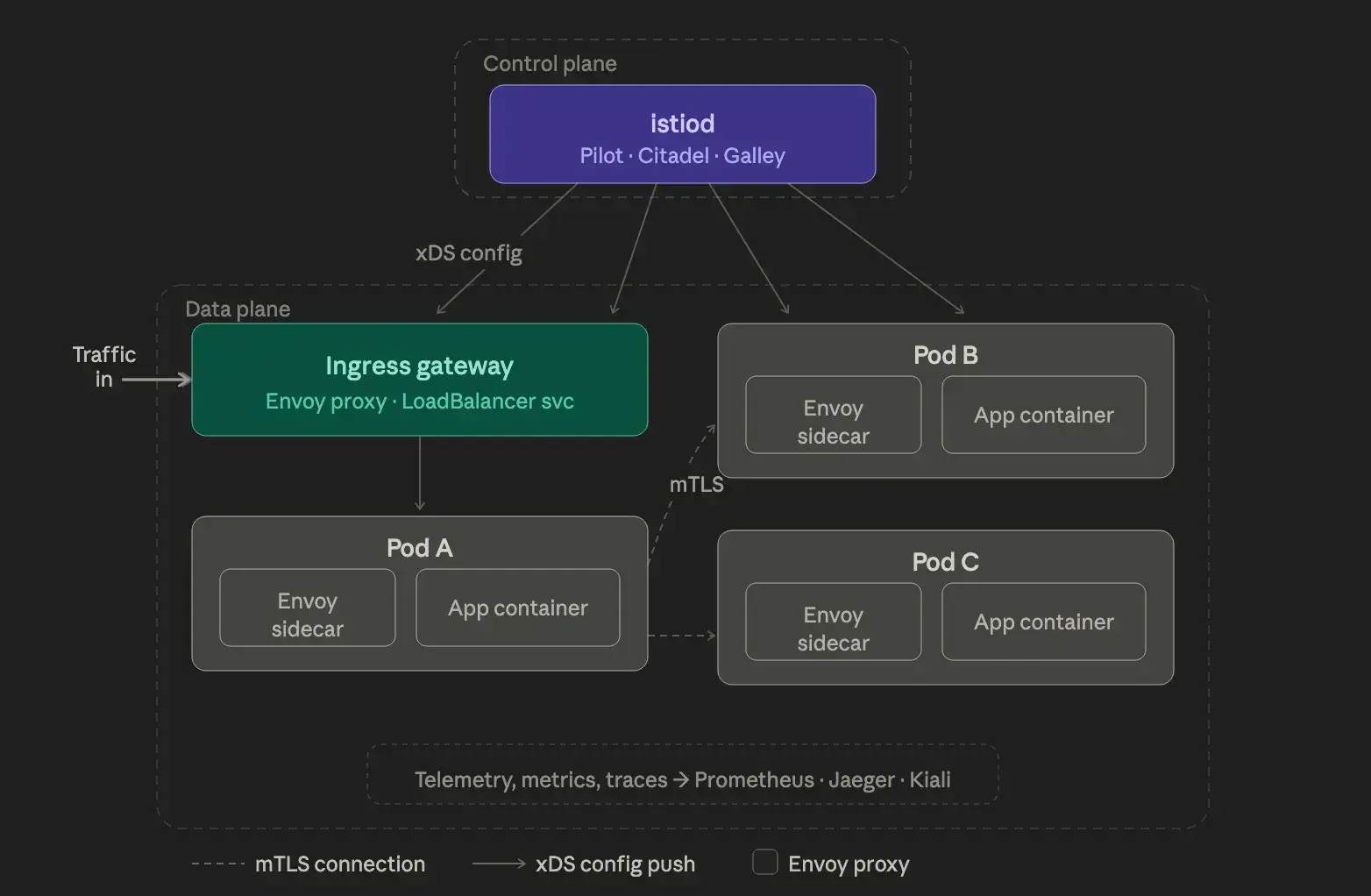
Installing Istio via Helm.
I use Helm rather than istioctl for two reasons. First, it's how I manage Istio on the production EKS clusters at work, so the muscle memory transfers. Second, Helm gives fine-grained control over resource requests, which matters on a laptop.
# 💻 Mac
kubectx orbstack

# Add helm charts
helm repo add istio https://istio-release.storage.googleapis.com/charts
helm repo update

# Step 1 - Base CRDs
helm install istio-base istio/base \
  --namespace istio-system --create-namespace \
  --set defaultRevision=default

# Step 2 - Control plane
# The PILOT_ENABLE_WORKLOAD_ENTRY_AUTOREGISTRATION flag is required on OrbStack
# to prevent DNS resolution conflicts with the host network.
helm install istiod istio/istiod \
  --namespace istio-system \
  --set pilot.env.PILOT_ENABLE_WORKLOAD_ENTRY_AUTOREGISTRATION=true \
  --set global.proxy.resources.requests.cpu=10m \
  --set global.proxy.resources.requests.memory=64Mi \
  --wait

# Step 3 - Ingress gateway
# OrbStack assigns a real LoadBalancer IP automatically - no MetalLB needed.
helm install istio-ingress istio/gateway \
  --namespace istio-ingress --create-namespace \
  --set service.type=LoadBalancer

# Verify the gateway got an EXTERNAL-IP
kubectl get svc -n istio-ingress
# NAME            TYPE           CLUSTER-IP   EXTERNAL-IP   PORT(S)
# istio-ingress   LoadBalancer   10.x.x.x     198.19.x.x    80:xxx/TCP

# Enable sidecar injection on the default namespace
kubectl label namespace default istio-injection=enabled
Gateways and Virtual Services on the native cluster.
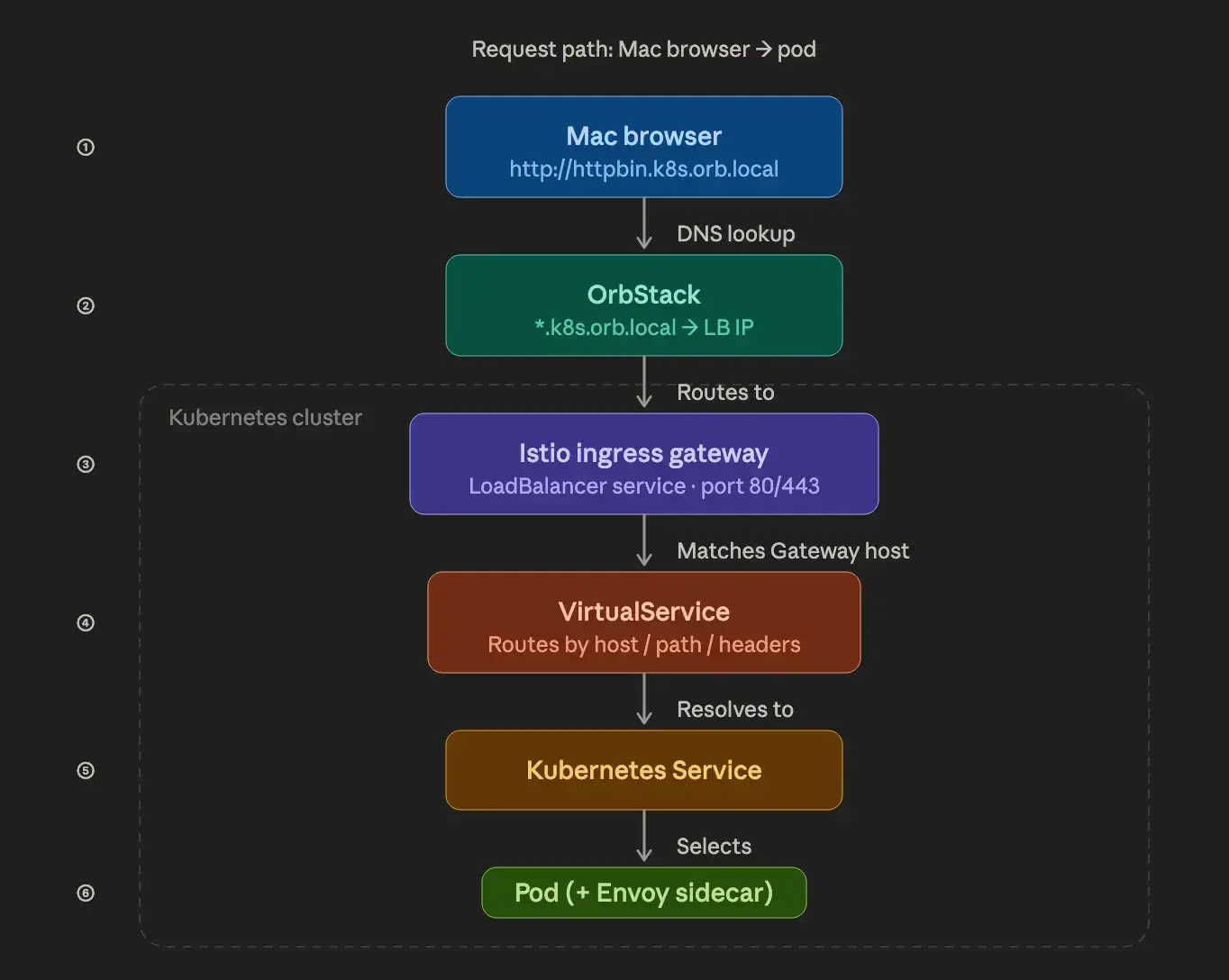
This is the moment OrbStack feels like cheating. You create a Gateway pointing at *.k8s.orb.local, and it just works from your Mac browser. No IP lookups. No /etc/hosts, no 127.0.0.1:8080 proxying.
How the traffic actually flows.
The Gateway resource binds to the istio-ingress LoadBalancer service, OrbStack intercepts traffic to the *.k8s.orb.localwildcard domain at the Mac level and routes it to that LoadBalancer IP. The Virtual Service then routes inside the cluster to the right service.
Example 1: Basic routing with httpbin:
# 💻 Mac
kubectl apply -f - <<EOF
apiVersion: apps/v1
kind: Deployment
metadata:
  name: httpbin
spec:
  replicas: 1
  selector:
    matchLabels:
      app: httpbin
  template:
    metadata:
      labels:
        app: httpbin
    spec:
      containers:
      - name: httpbin
        image: kennethreitz/httpbin:latest
        ports:
        - containerPort: 80
---
apiVersion: v1
kind: Service
metadata:
  name: httpbin
spec:
  selector:
    app: httpbin
  ports:
  - port: 80
    targetPort: 80
---
apiVersion: networking.istio.io/v1beta1
kind: Gateway
metadata:
  name: httpbin-gateway
spec:
  selector:
    istio: ingress
  servers:
  - port:
      number: 80
      name: http
      protocol: HTTP
    hosts:
    - "httpbin.k8s.orb.local"
---
apiVersion: networking.istio.io/v1beta1
kind: VirtualService
metadata:
  name: httpbin
spec:
  hosts:
  - "httpbin.k8s.orb.local"
  gateways:
  - httpbin-gateway
  http:
  - route:
    - destination:
        host: httpbin
        port:
          number: 80
EOF
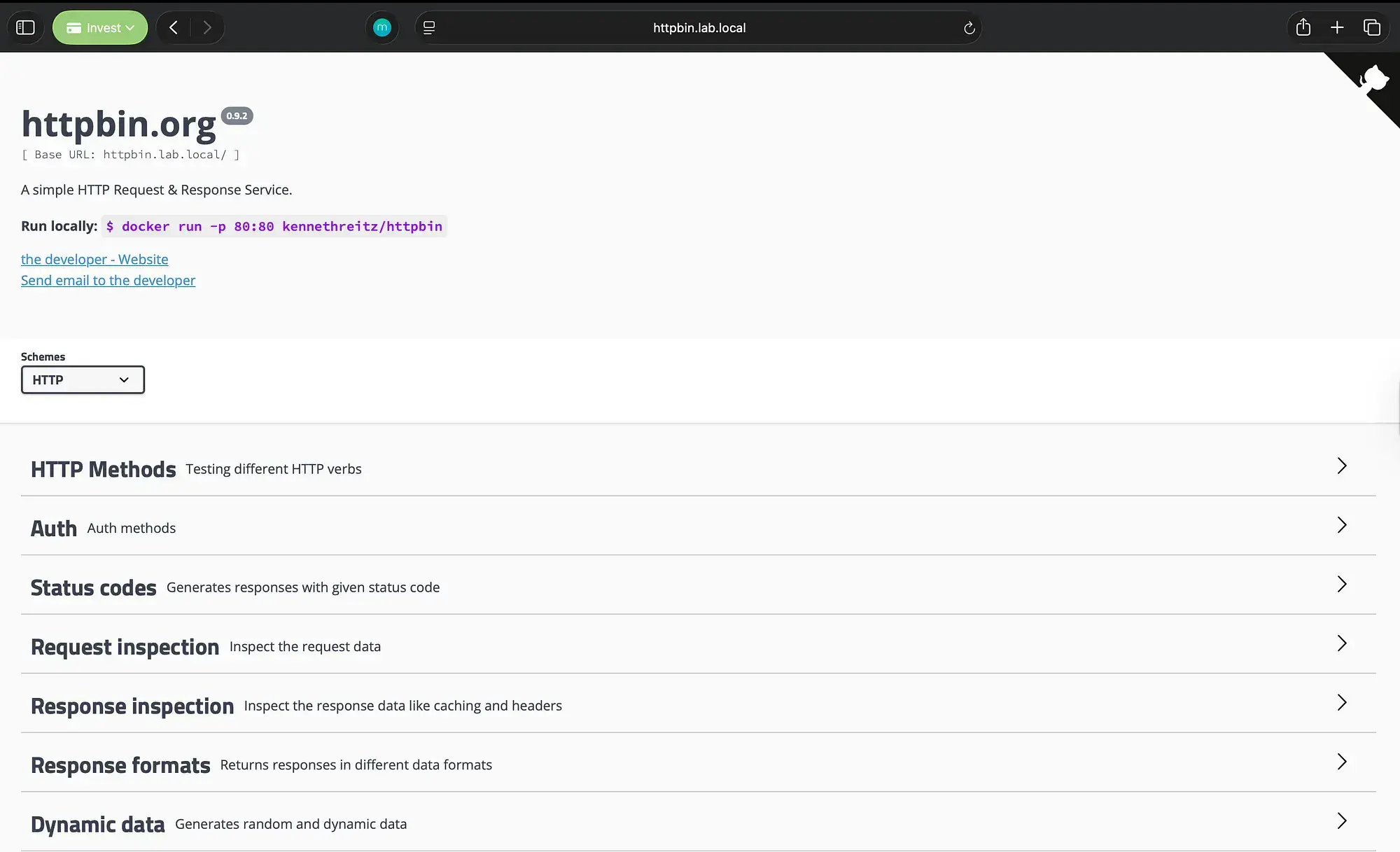
Open http://httpbin.k8s.orb.local in your Mac browser. It works immediately.
Example 2: Traffic splitting (canary):
The same pattern used in production canary deployments:
# 💻 Mac
kubectl apply -f - <<EOF
apiVersion: networking.istio.io/v1beta1
kind: VirtualService
metadata:
  name: myapp-split
spec:
  hosts:
  - "myapp.k8s.orb.local"
  gateways:
  - myapp-gateway
  http:
  - route:
    - destination:
        host: myapp-v1
        port:
          number: 80
      weight: 80
    - destination:
        host: myapp-v2
        port:
          number: 80
      weight: 20
EOF
Example 3: Path-based routing:
Route /v1 and /v2 to different backend services:
# 💻 Mac
kubectl apply -f - <<EOF
apiVersion: networking.istio.io/v1beta1
kind: VirtualService
metadata:
  name: path-routing
spec:
  hosts:
  - "api.k8s.orb.local"
  gateways:
  - api-gateway
  http:
  - match:
    - uri:
        prefix: /v1
    route:
    - destination:
        host: api-v1-svc
        port:
          number: 80
  - match:
    - uri:
        prefix: /v2
    route:
    - destination:
        host: api-v2-svc
        port:
          number: 80
EOF
One OrbStack gotcha: don’t enable httpsRedirect!
Do not use httpsRedirect: true in a Gateway on the native cluster. OrbStack intercepts LoadBalancer traffic in a way that causes an infinite 301 redirect loop when TLS redirect is enabled.
# ❌ This breaks on OrbStack native K8s
servers:
- tls:
    httpsRedirect: true

# ✅ Use plain HTTP on the native cluster
servers:
- port:
    number: 80
    protocol: HTTP
For TLS testing, use Cluster 2 (the VM cluster, coming in Part 3), where you have full control over the network stack.
Installing the rest of the daily stack:
Vault in dev mode.
Dev mode trades durability for speed. No unsealing, no persistence concerns, instant startup. It’s the right call for the daily-driver cluster where I’m testing AppRole workflows, PKI policies, or Kubernetes auth configurations, and the value is in iteration speed, not data preservation.
# 💻 Mac
helm repo add hashicorp https://helm.releases.hashicorp.com
helm repo update

helm install vault hashicorp/vault \
  --namespace vault --create-namespace \
  --set "server.dev.enabled=true"

kubectl get pods -n vault
# vault-0   1/1   Running   0   30s
For production-grade Vault with HA Raft storage, use Cluster 2 (Part 3). Dev mode here is intentional — it trades durability for speed.
Crossplane:
Crossplane turns the Kubernetes cluster into a universal control plane for cloud infrastructure. I use it heavily with the AWS provider at work.
# 💻 Mac
helm repo add crossplane-stable https://charts.crossplane.io/stable
helm repo update

# Note: --enable-composition-functions was removed in newer versions.
# Composition Functions are enabled by default now.
helm install crossplane crossplane-stable/crossplane \
  --namespace crossplane-system --create-namespace

kubectl get pods -n crossplane-system
Stop/start without losing your work.
# 💻 Mac

# Stop - releases all CPU and RAM
orb stop k8s

# Start - full state persists (deployments, services, secrets, configmaps)
orb start k8s

# Verify
kubectx orbstack
kubectl get nodes
kubectl get pods -A
The native cluster state persists across stop/start. Vault dev mode data is lost on restart by design, but everything else, Crossplane installations, Istio configuration, and your workload deployments come back exactly as provisioned.
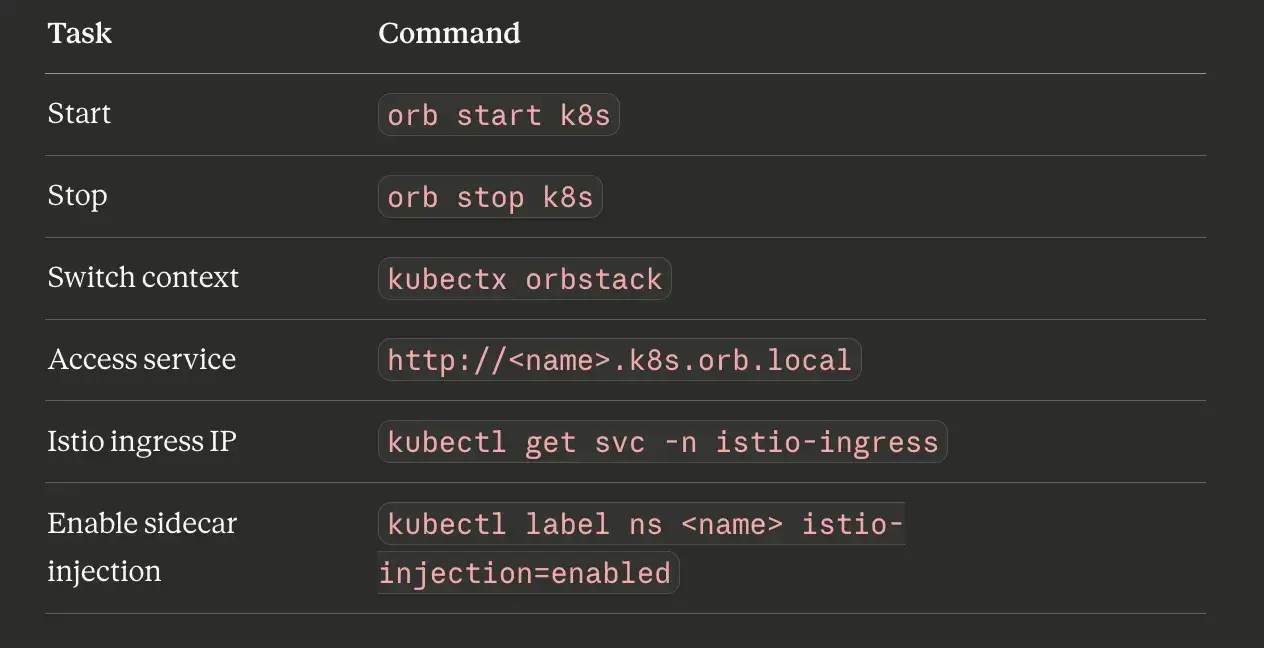
Quick reference for this cluster:
What’s next.
The daily-driver cluster is the easy half of this lab. The hard half is the one that mirrors production, a real multi-node kubeadm cluster running on four VMs, with HashiCorp Vault as its certificate authority.
That’s where Part 3 picks up: creating the VMs, wiring their networking, and standing up a 3-tier Vault PKI that will sign every certificate in the cluster.
← Part 1: Why I Replaced Multipass with OrbStack.. | Part 3: Building a Production-Grade Vault PKI for a Local kubeadm Cluster Without the Shortcuts →
I’m Noah Makau, a DevSecOps engineer based in Nairobi. I run a small DevOps consultancy and hold CKA, CKAD, and AWS Solutions Architect Professional certifications, currently preparing for CKS. I write about Kubernetes, Vault, Crossplane, and the day-to-day of running platforms that actually have to stay up.


